Learning Path
First-time learners can start with the basic units. Learners who already know the context, or facilitators preparing workshops, can go directly to the advanced units and activities.
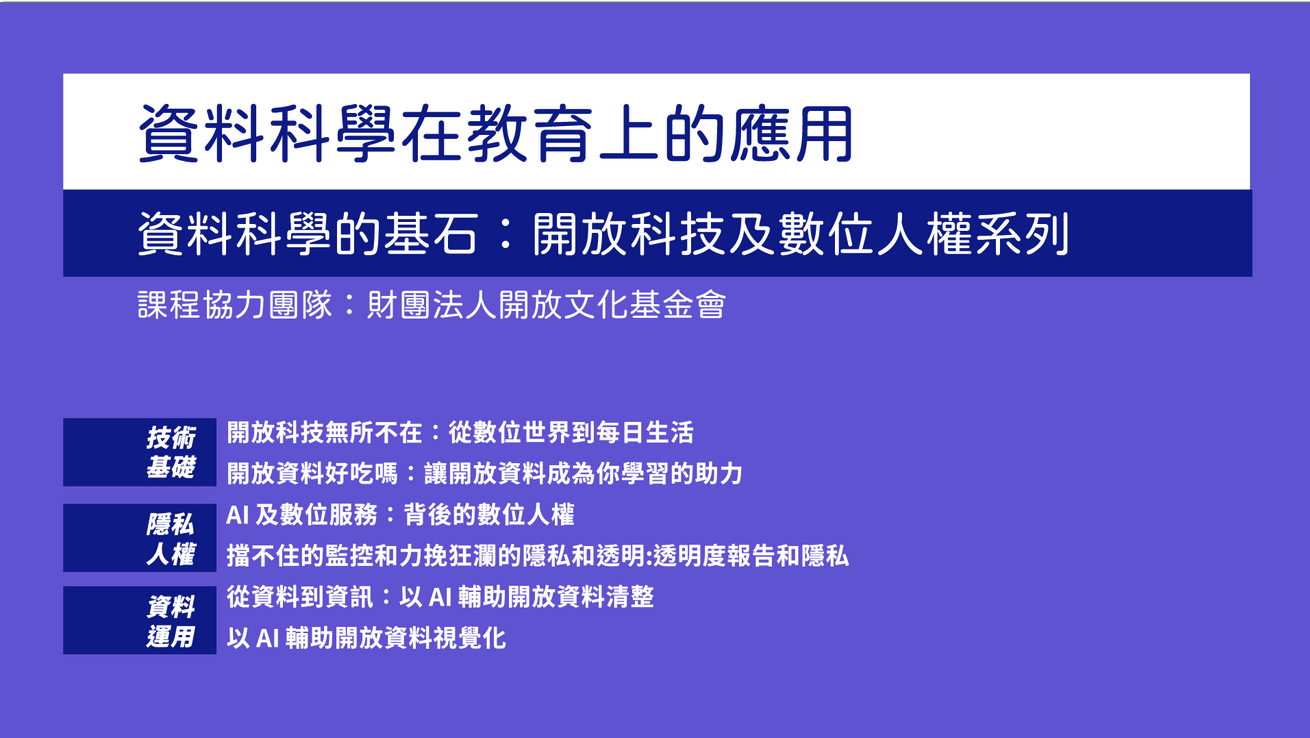
This course is designed for learners who want to quickly understand the context of open technology. It is also useful for speakers, educators, and community organizers who want to reuse the materials for teaching. The page brings together slide decks, lesson outlines, and hands-on activities so learners can start from either the basic or advanced units.
Note: The embedded course videos and slide decks are currently in Mandarin Chinese.
This course was filmed with support from lecturer Ming-Lun Chung for the Data Science in Education course in the Educational Big Data micro-credential program at National Taiwan Normal University.
First-time learners can start with the basic units. Learners who already know the context, or facilitators preparing workshops, can go directly to the advanced units and activities.
Each unit includes an outline, learning goals, activity prompts, and slide links, making it easier to adapt the materials into short talks or workshops.
Most materials are presented as Google Slides and released under CC BY or CC BY-SA licenses; some internal materials have separate licensing terms.
The following materials are collected from a public Google Drive folder. They are presented as Google Slides for online learning and teaching use. The slide decks and course videos are currently in Mandarin Chinese.
From the digital world to everyday life
Google SlideMaking open data a learning resource
Google SlideThe digital rights behind them
Google SlideUnstoppable surveillance and privacy as a counterforce
Google SlideFrom data to information
Google SlideBasic and advanced practice
Learn how open technology connects to daily life through open culture, open data, data governance, and civic technology projects.
This unit is a good first step for learners who are new to open technology and want to build a quick overview.
Use marketing cases around open resources to understand AI tool use, privacy protection, and digital social responsibility.
This unit can lead into the advanced units on corporate digital rights and transparency reports as an entry point to AI and digital rights.
Start from copyright, Creative Commons, and open data to understand how cultural resources can be shared, circulated, and reused.
This unit can be paired with the OCF Open Technology handbook and open licensing cases as a foundation for reusing cultural or community teaching materials.
The advanced units are designed as a connected course. Each session is around 2-3 hours and works well with discussion, experiential activities, and hands-on practice, helping learners understand the internet freedom and digital rights issues behind open technology.
Understand free software, open collaboration, and ways to participate in open source projects, with a small activity using Open Source Star Village.
Open the open source project cards, choose a card that interests you, and analyze it from the four angles of FACT, FEELING, FIND, and FUTURE.
Understand the spirit of open data, data quality, and how to use open data platforms, then practice finding data from an issue.
Think about the open data you would expect to find in your academic field, search for it on a government open data platform, and record the data you cannot find while analyzing possible reasons.
Use RDR indicators and everyday platform cases to understand corporate responsibilities around privacy, freedom of expression, and governance.
Open the corporate digital rights report, choose a service you use often, and explain what issues you observe from its score.
Understand government surveillance, platform data requests, and transparency reports, and identify how private digital services respond to law enforcement requests.
Choose a digital service you use often, read its terms of service and transparency report, and analyze how it handles your data when the government requests information.
Learn about data formats, spreadsheet basics, and common data issues, then practice using AI tools to support data cleaning.
Use the sample dataset prepared for cleaning practice and try to organize it into a clean, analyzable dataset.
From LLM prompts and data analysis to charts and visualization, practice turning open data into communicable information.
Use data combinations such as listed-company information disclosure violations and historical closing prices from the Taiwan Stock Exchange, or Hsinchu County factory industry categories and consolidated income tax statistics, to practice forming analysis questions and creating visualizations.
The following resources are not course slide materials, but they are useful for preparation, follow-up reading, and facilitation design.
Understand the conceptual background of open source, open data, and open government.
Follow-up reading for the corporate digital rights and transparency report units.
A board game project and activity resource for learning about open collaboration and community participation.